Daily Route Delivery Predictor
A Make.com scenario that reads my daily delivery route from Google Sheets, runs it through two sequential Gemini analysis passes, and routes a formatted email report to my own inbox based on whether any stops exceed the 45-minute delay threshold. Built for personal use on representative route data.
The problem
Every morning as a retail merchandiser covering DFW, my manager sends the day's delivery route — stop order, store names, store numbers, scheduled arrival times. I open it and spend 10–15 minutes mentally mapping it: which stops are likely to run late, where the bottlenecks will hit, how to structure my day around what the route is actually going to do rather than what it says it will do. That mental model was mine to build every morning, from raw data. The route doesn't change its structure. The logic for reading it doesn't change. The question was whether I could automate that morning analysis so I could start the day with a plan rather than building one from scratch.
The solution
A Make.com scenario built for personal use — not a manager dashboard, but a tool for myself. It reads the route my manager sends, runs it through two sequential Gemini AI analysis passes, calculates where delays are likely to stack up, and routes a formatted email report to my own inbox based on whether any stops exceed the 45-minute delay threshold. The pipeline: • Google Sheets — Search Rows (pass 1) — reads the route data from the primary sheet. • Google Sheets — Search Rows (pass 2) — pulls supporting reference data for the analysis. • Google Gemini AI — Simple text prompt (pass 1) — first AI analysis of the route data; generates initial delay estimates and stop-level risk assessment. • Google Gemini AI — Simple text prompt (pass 2) — second AI pass refining the analysis and producing the structured output used downstream. • JSON — Parse JSON — parses the structured Gemini output into discrete fields for downstream mapping. • Tools — Set variable — stores parsed delay values as variables for the router condition. • Google Sheets — Update a Row — writes the AI-generated analysis back to the sheet with delay data and ETA. • Tools — Set aggregator — aggregates flagged stops (those exceeding the 45-minute threshold) into a single structured block for the email body. • Router — branches on the "Delay Over 45" condition: delays exist → Gmail sends "⚠️ Delay Alert - Action Required" listing each flagged stop with store name, stop number, delay in minutes, and AI ETA. All on time → Gmail sends "✅ All Deliveries On Time - Daily Route Summary" with a single-line confirmation. The 45-minute threshold lives in the Router condition — adjustable without touching the Gemini prompts or any other module. Using two sequential Gemini passes rather than one handles the complexity cleanly: the first reasons about the route, the second formats for machine consumption. Asking one prompt to do both tends to produce inconsistent JSON.
Workflow architecture
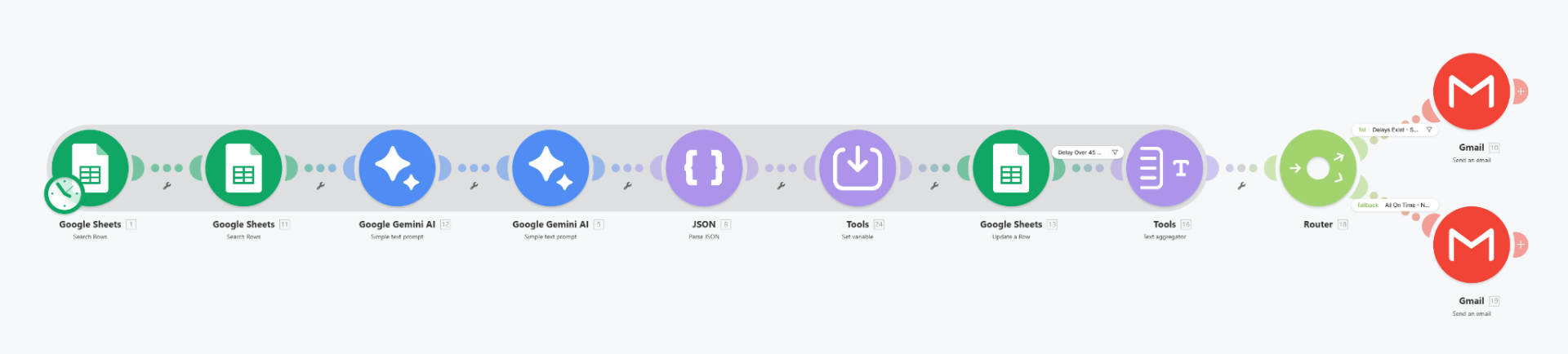
The Gemini prompt design
Two sequential Gemini prompts handle different layers of the analysis. The first prompt processes raw route data and generates per-stop delay estimates. The second takes those estimates and produces the structured output — store name, stop number, delay minutes, AI ETA — that the JSON parser and aggregator downstream can work with reliably. Using two passes rather than one prompt handles the complexity cleanly: the first pass reasons about the route, the second formats for machine consumption. Asking one prompt to do both tends to produce inconsistent JSON structure.
Benefits
- Replaces a 10–15 minute manual morning mapping ritual with an AI-generated read of the day, delivered before I leave the house
- Two-pass Gemini design separates reasoning from formatting, producing structured JSON the aggregator can rely on
- Router branching means an on-time day produces a short single-line confirmation; a delayed day produces an actionable flagged-stop list — no noise either way
- Threshold is a single Router condition — adjustable without touching the prompts
Honest limitations
representative data, not production data. The workflow was built and tested against route data constructed for the training project. It has never run against a real company's live dispatch feed or validated its delay predictions against actual arrival outcomes. The architecture is sound — the data foundation is synthetic. No live trigger: the scenario reads from a Google Sheet that requires manual input; a production version would connect to a live dispatch system or ERP via API. Single-user scope, built and tested on one route pattern; different route structures, store mixes, or delivery windows would require Gemini prompt and schema adjustments.
Output examples
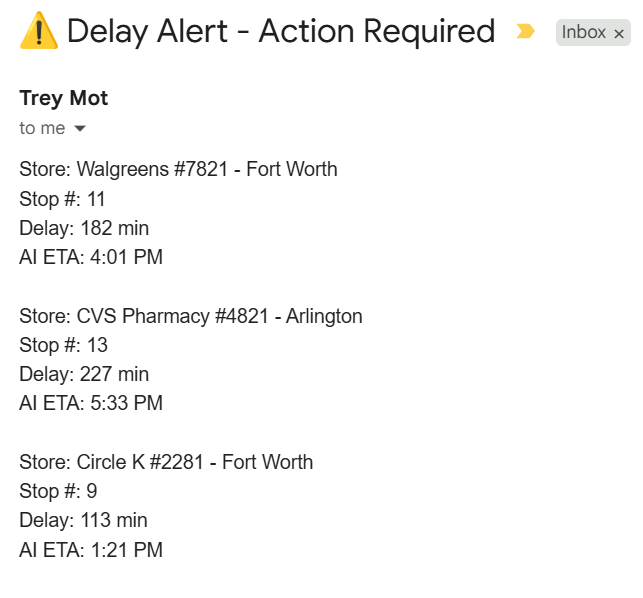
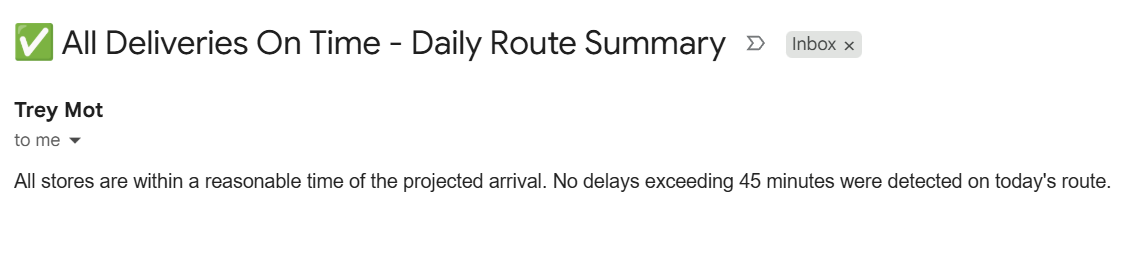
What's next
live dispatch feed integration to eliminate manual daily input, threshold configuration exposed as a scenario variable rather than a hardcoded Router condition, and a feedback loop where actual arrival times are logged post-day and accuracy is tracked over time by store type.